The Roku App (Official)
- 4.7
- Rating
- 100.00M
- Installs
- Free
- Price
 Analysis by App-foxy
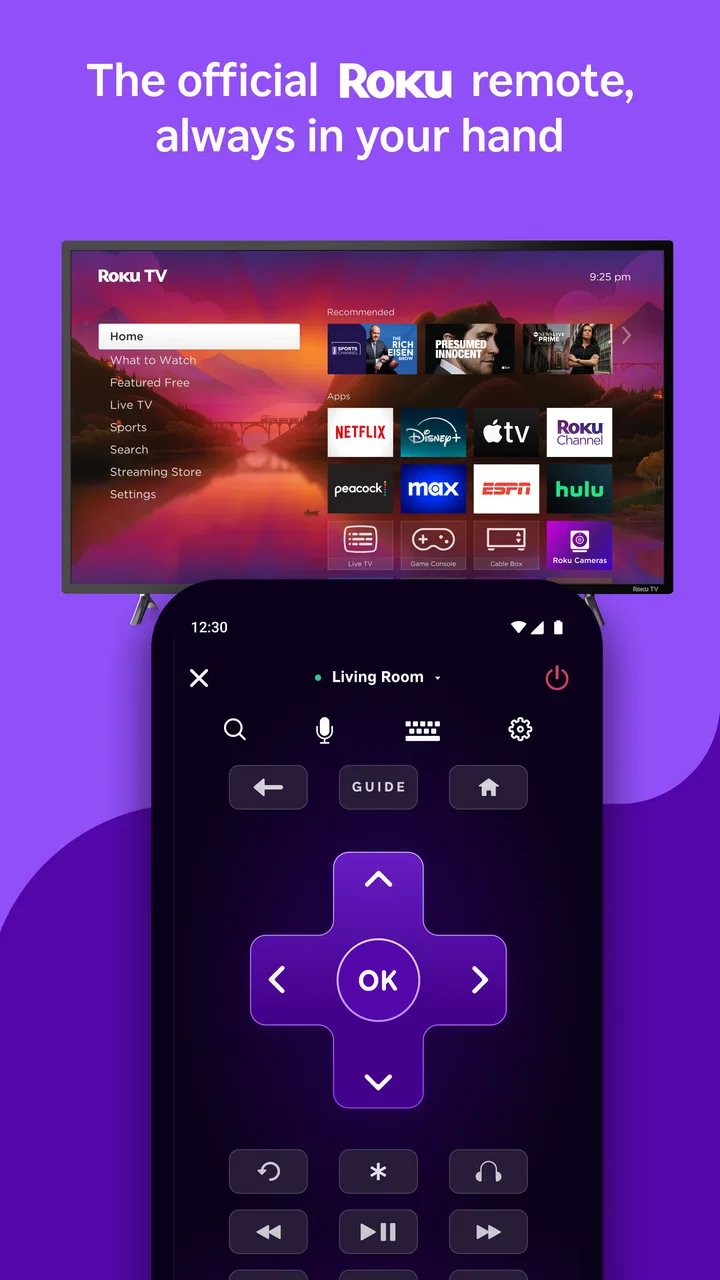
I use the Roku App (Official) as a practical companion for a Roku streaming setup rather than as a replacement for every entertainment app on my phone. That distinction matters. The app is free, belongs to the Entertainment category, and is developed by Roku, Inc. and its affiliates. Its job is to make a Roku player or Roku TV easier to control, browse, and use from a mobile device.
After spending time with it, my view is straightforward: this is most useful when your Roku remote is inconvenient, missing, or not close at hand. It also makes searching for films and shows less awkward than typing with an on-screen remote. If you already enjoy Roku’s interface and want a second way to interact with it, I would recommend trying it. If you are looking for a universal control app for every brand of television and streaming box, I would look elsewhere.
What I would consider before choosing it
The first decision is whether you actually use Roku hardware. The app is designed around Roku devices, so its value depends on having a compatible Roku player or television available. It is not a general entertainment hub that independently replaces your streaming subscriptions, and it is not the best answer for someone whose main device is built around another platform.
You May Also Like

 Pandora - Music & Podcasts
Pandora’s Music Is Easy to Start, but Harder to Recover
Pandora’s strength is its low-effort path from a seed to a station. Its weak spot is how much confidence it asks you to place in connection, setup, and quiet recovery.

 8 Ball Pool
 Is Built on Rivalries, Rematches, and Routine
A close look at the rivalries, rematches, shared routines, and unanswered safety questions that turn a quick pool match into a persistent mobile community.

 Samsung Music
’s Quiet Strength Is Playing What You Already Own
Its reach comes less from spectacle than from dependable access to a personal library. That simplicity is both the app’s strongest retention engine and its ceiling.

 AccuWeather: Weather Radar
AccuWeather Review: A Quick, Clear Forecast for Everyday Decisions
For everyday plans, the best forecast is the one you can understand quickly. AccuWeather makes rain timing, radar, and local conditions easy to act on, with a few trade-offs.

 Hill Climb Racing
Why Hill Climb Racing Still Turns Crashes Into One More Run
A tiny car, a bumpy hill and one more upgrade: Hill Climb Racing keeps resurfacing because its simple chaos makes every near-miss feel personal.

 AliExpress - Shopping App
AliExpress Makes Global Shopping Feel Personal, but Shoppers Bear the Risk
AliExpress turns a global marketplace into a pocket-sized discovery engine. Its reach is useful, its shopping loop compelling, and its trade-offs easy to miss.
More From Our News Desk
View All News


I would also think about how you normally watch television. For quick volume changes, pausing, or moving around a menu, a physical remote is often faster because it works without opening a phone. The mobile app becomes more attractive when the remote has disappeared into the sofa, when several people want to search, or when entering a title with a phone keyboard is easier than selecting letters one at a time.
Another useful criterion is how much you value convenience over simplicity. A phone adds possibilities, but it also introduces another screen, another app to open, and another device that needs to be available. I found that the app is at its best when it solves a specific annoyance. It is less compelling if you want the fewest possible steps between sitting down and watching something.
The audience response suggests that many Roku owners find that trade-off worthwhile. The app holds a 4.7 average from around four million ratings, with roughly 251 thousand written reviews. Those figures do not make it perfect for everyone, but they do show that the basic idea works for a large number of people.
The everyday problem it solves
A typical evening makes the use case clear. I might sit down ready to watch something, discover that the remote is in another room, and reach for my phone instead. With the Roku App (Official) open, the phone can act as the nearby control surface. That saves a small amount of effort, but the benefit becomes more noticeable when the remote is lost, its buttons are difficult to use, or someone else is already holding it.
Searching is another strong example. If I have a particular actor, series, or film in mind, typing on a phone is usually more comfortable than navigating a television keyboard with directional buttons. I can search while another person is still deciding what to watch, which makes the app useful in a shared living room rather than only as an emergency remote.
There is also a quieter advantage: a phone is personal. A physical remote may be passed around, while the mobile app lets me keep control in my own hand. That can be helpful when a household has different preferences about browsing, or when I want to find something without interrupting what is already playing.
Where the Roku experience feels strongest
The biggest strength is focus. Because the app comes from Roku, it feels like a natural extension of the Roku experience instead of a generic remote trying to guess how a particular platform behaves. I do not have to learn a completely unrelated control scheme, and the purpose is clear from the moment I open it.
For me, the most valuable feature is not simply replacing directional buttons. It is reducing the friction around discovery. Browsing a large collection through a television interface can feel slow, especially when I already know roughly what I want. Using a phone gives that process a more familiar shape and makes the search step less tedious.
I also like the app as a backup. A physical remote is easy to misplace, and replacing it is an unnecessary expense when the phone is already in my hand. Keeping the official app installed means I have another route into the Roku system when the usual remote is unavailable. That backup role alone can justify the small amount of setup for many households.
The app has also proved useful when the viewing environment is awkward. If the television is across the room, if the remote buttons are hard to distinguish in dim light, or if I am trying not to wake someone by searching around for the controller, the phone can be more convenient. These are modest situations, but they are exactly the kind of small interruptions that make a streaming session feel less smooth.
Practical habits that make it more useful
I would install and test the app before an emergency rather than waiting until the remote has vanished. The first useful check is simple: make sure the phone and Roku setup can work together while everything is functioning normally. That way, I know the app is ready when I need it and do not waste time troubleshooting during a film.
My second tip is to treat the app as a search and discovery tool first, and a permanent remote second. The physical controller remains quicker for repeated basic commands, while the phone is better for entering words and exploring options. Switching between those roles instead of insisting on one device for everything feels more natural.
A third helpful habit is to keep the phone charged when I expect to use it for a long viewing session. This sounds obvious, but a phone-based remote depends on the phone remaining available. A physical remote can sit on the armrest for days; a mobile device is also used for calls, messages, navigation, and other tasks. That is a real trade-off rather than a flaw unique to Roku.
I would also avoid opening the app simply because it is available. If I already know what I am watching and the remote is beside me, the phone adds no meaningful benefit. The best workflow is selective: use the mobile interface when typing, browsing, or finding the remote would otherwise slow things down.
Limits I noticed in real use
The app cannot remove every inconvenience associated with streaming. It still depends on the Roku environment, and it does not magically make a subscription available or change what a particular service offers. I still have to deal with the same content choices and account arrangements that exist on the television.
There is also a psychological cost to using a phone during television time. I may open the app to adjust something and then notice a message or another notification. A physical remote keeps the task focused; a smartphone can pull attention away from the programme. For anyone trying to reduce screen distractions, that matters.
Another limitation is that a phone is not always the most comfortable control device. A remote has tactile buttons, so I can often operate it without looking down. On a touchscreen, I need to see where I am pressing, and the feel of the controls is less immediate. I would not recommend abandoning a good physical remote just because the app exists.
Households should also consider who will use it. A person who is comfortable with smartphone apps will probably understand the appeal quickly. Someone who prefers a simple controller may find the extra layer unnecessary. In a shared home, the app is most successful when it complements the physical remote rather than forcing everyone to change how they watch.
How it compares with the usual alternatives
The clearest alternative is the standard Roku remote. That option wins on immediacy: pick it up, point or use it, and continue watching. It does not compete for battery life with the rest of the phone, and it is easier to use without looking. If your remote is reliable and you rarely search for unfamiliar titles, the app may feel optional.
A second alternative is the remote supplied with another streaming platform. That may be a better fit if your household mainly uses hardware from a different ecosystem. In that situation, the Roku App (Official) would add another control method without solving the central problem. I would choose the app that matches the device I actually use most, not the one with the most attractive description.
Universal remote apps are another category. Their appeal is breadth: one application may try to control equipment from several manufacturers. That can be useful in a mixed setup, but broader compatibility can also mean a less focused experience. Roku’s official app makes more sense when Roku is the centre of the living-room setup and I want the most direct companion for it.
Finally, there is the option of using only the individual streaming services installed on the television. Those apps are appropriate when I already know which service contains the programme I want. The Roku app is more useful before that decision, when I am browsing the Roku environment or trying to search without jumping between separate service apps.
Who should use it, and who should skip it
I would recommend it to Roku owners who frequently misplace the remote, search for titles often, or want a convenient backup. It is especially sensible for people who already keep their phone nearby while watching television. Families and shared households may also appreciate having another way to browse without passing the physical remote around constantly.
I would be more cautious for someone who wants a completely distraction-free viewing setup. If your phone is normally kept away during films, the app may not improve the experience. The same is true for anyone whose television setup is not based on Roku. In those cases, a matching official app or the supplied physical controller is likely to be the more sensible choice.
It is also not the right pick if your main expectation is that a mobile app will replace every part of your entertainment system. Its role is narrower and more useful than that: it connects the phone to the Roku viewing experience. Once I understood that boundary, I found the app easier to judge fairly.
What switching actually involves
Moving from a physical remote to the app is not a dramatic change, but it does require a small adjustment. I need to remember where the app is, keep the phone available, and become comfortable with touchscreen controls. The benefit is strongest when I use it for tasks that phones handle well, particularly searching and browsing.
There is no reason to make the switch all at once. I would keep the physical remote as the primary controller and use the app for a week whenever the remote is inconvenient. That trial quickly reveals whether the phone fits my habits. If I only open it once, I have learned that the traditional remote already meets my needs. If I reach for it repeatedly, it has earned a permanent place on the phone.
The app is free, which makes that experiment easy. It has been available since March 2, 2012, and its current version is 13.4.0.7242945 for devices running Android 9 or later. It carries a Teen content rating, so families should consider that label alongside their own household rules rather than assuming every user will have the same experience.
Roku’s scale also makes the app feel like an established companion rather than a short-lived experiment. It has passed 50 million installs, which is a useful sign that the mobile-control approach is familiar to many Roku households. I still would not choose it solely because of popularity; the deciding factor remains whether its phone-based workflow solves a problem in my own room.
My recommendation after using it
I recommend the Roku App (Official) as a strong companion for people who already use Roku and want easier searching, a dependable backup control method, or a more personal way to browse. Its best qualities appear in ordinary moments: the remote is missing, the title is difficult to type, or several people want to explore without fighting over one controller.
I would not call it an automatic replacement for the physical remote. The traditional controller remains better for quick, blind operation and for viewers who want their phone out of reach. Universal remote tools may suit mixed-brand homes, while another platform’s official app may be more appropriate when Roku is not the main device.
For me, the decision is simple. If Roku is central to your entertainment setup, the app is worth installing because it adds useful flexibility without a purchase. Use the physical remote when speed and simplicity matter, and open the phone app when searching, browsing, or recovering from a missing controller matters more. That balanced approach is where this free Entertainment app makes the most sense.
FAQs for The Roku App (Official)
01What is The Roku App and how does it work?
The Roku App is an official application that transforms your mobile device into a control center for your Roku streaming player or Roku TV. It allows you to stream content, use voice commands, and even listen privately through headphones. To use the app, ensure your device is connected to the same Wi-Fi network as your Roku device.
02Is The Roku App free to use?
Yes, The Roku App is free to download and use. However, while the app itself doesn’t have a cost, some of the content available through the app may require subscriptions or in-app purchases. Be sure to check each channel's requirements for any additional fees.
03Can I use The Roku App on any mobile device?
The Roku App is available for both Android and iOS devices. Ensure that your device meets the required operating system specifications: Android devices should be running version 5.0 or later, and iOS devices need to be on iOS 11.0 or later. Compatibility enhances the app's performance and usability.
04What features does The Roku App offer for enhancing my viewing experience?
The Roku App offers a variety of features, such as voice search for hands-free navigation, private listening via headphones, and the ability to stream media from your phone. It also includes a remote function for controlling your Roku device, making it a versatile tool for enhancing your viewing experience.
05How do I troubleshoot common issues with The Roku App?
If you encounter issues with The Roku App, ensure your mobile device and Roku are on the same Wi-Fi network. Restarting both devices often resolves connectivity problems. If the app continues to malfunction, check for updates in the app store or consider reinstalling it. For persistent issues, visiting Roku's support page can provide additional help.
Pros
- User-friendly interface for easy navigation.
- Quick access to all Roku devices.
- Seamless streaming control from your phone.
- Voice search functionality works well.
- Free to download and use.
Cons
- Requires stable Wi-Fi for optimal use.
- Limited functionality without a Roku device.
- Occasional lag in remote control feature.
- Not all features available on older devices.
- Some users report connectivity issues.

The Roku App (Official)
Gallery